
Download TimerAPP TV – Timer, Fitness, Workout, Android, Free, PC Software
Overview
TimerAPP TV is a free Android application designed to support users in managing time-based activities, particularly within fitness and wellness routines. Developed by Stefano Bellusci, the app aims to simplify the execution of timed exercises, intervals, and recovery periods commonly used in training regimens. It serves as a digital timer for workouts, meditation sessions, or any activity requiring precise time tracking. The app is especially suited for fitness enthusiasts, athletes, and individuals following structured training programs. It may also appeal to users interested in mindfulness practices that rely on timed sessions. Although the developer did not provide additional background information, the app’s focus on functionality and simplicity suggests a targeted approach to time management in personal wellness. Real-world usage scenarios include circuit training, HIIT workouts, yoga flows, and breathwork routines. The app’s design emphasizes ease of access and minimal distractions, making it ideal for use during physical or mental exercises.Key Features & Capabilities
- Customizable Timer Settings: Users can set precise durations for work and rest intervals, allowing flexibility for different training styles such as HIIT, Tabata, or pyramid workouts.
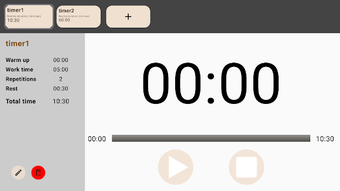
- Simple Interface: The app features a clean, distraction-free display with large, easy-to-read time counters and minimal controls for seamless operation during use.
- Audio Alerts: Built-in sound cues signal the start and end of each interval, helping users stay synchronized without needing to constantly check the screen.
- Offline Functionality: TimerAPP TV operates without requiring an internet connection, making it reliable during workouts in areas with poor connectivity.
- Language Support: The application is available only in English, ensuring consistent access to features across all supported devices.
User Interface, Workflow & Performance
The user interface of TimerAPP TV is designed with simplicity and clarity in mind. It presents a central countdown timer with a large, legible display, supported by minimal navigation elements. Users can access settings through a straightforward menu, where they can adjust interval durations, choose between countdown and count-up modes, and customize alert sounds. The workflow is linear and intuitive—set the timer, start the session, and let the app handle the rest. Navigation remains consistent across screens, minimizing the learning curve. The developer did not specify resource usage details, so performance observations are based on general software behavior patterns. The app is expected to operate efficiently with low CPU and RAM consumption, typical of lightweight Android utilities. Stability appears to be a priority, as the app functions without requiring constant background processes. Users can expect smooth transitions between intervals and reliable alert delivery. However, exact performance metrics were not provided.Compatibility & System Requirements
TimerAPP TV is designed for Android devices running version 13.0 or higher. The app’s installation size is 22.1 MB, which is relatively compact for a functional utility. This suggests efficient code optimization and minimal bloat. The developer did not provide additional hardware requirements, such as minimum RAM or processor specifications. Compatibility information was partially provided, and users should ensure their device meets the Android 13.0 requirement. The app is not available on other platforms such as Windows, Mac, or iOS. The current version is 3.2.1, released on March 4th, 2024. It is distributed as a free software with some limitations, indicating that while core functionality is accessible, advanced features may require a premium upgrade or are restricted in the free version.Pros and Cons
Pros
- Free to download and use with no upfront cost.
- Simple, distraction-free interface ideal for workouts and mindfulness.
- Offline operation ensures reliability in any environment.
- Customizable timer intervals for various training styles.
- Small file size (22.1 MB) reduces storage impact.
Cons
- Only available in English, limiting accessibility for non-English speakers.
- Android-only platform, with no support for Windows, Mac, or iOS.
- Free version includes limitations, though specific restrictions were not disclosed.
- Requires Android 13.0 or above, excluding older devices.
- Developer did not provide detailed system requirements beyond OS version.
FAQ Section
Is TimerAPP TV available for Windows or Mac?
TimerAPP TV is currently available only for Android devices. There is no version available for Windows, Mac, or other operating systems.
Can I use TimerAPP TV without an internet connection?
Yes, the app functions entirely offline. It does not require an internet connection to operate, making it suitable for use during workouts or in areas with limited connectivity.
What is the file size of TimerAPP TV?
The current version of TimerAPP TV is 22.1 MB, which is relatively small for a functional timer application.
Does TimerAPP TV have in-app purchases or a premium version?
While TimerAPP TV is free to download, it includes some limitations in the free version. Specific details about premium features or in-app purchases were not provided by the developer.
How often are updates released for TimerAPP TV?
The latest version, 3.2.1, was released on March 4th, 2024. The frequency of future updates has not been disclosed.







